Are QR Codes Safe? Security Risks and Protection Tips
QR codes can't infect a phone on their own, but they can lead somewhere harmful. How QR scams (quishing) work, the warning signs, and habits that keep you safe.
QR codes themselves are harmless: a pattern of squares that encodes a bit of text. Scanning one can't infect your phone. The risk is entirely in where the text sends you and what you do next. Because a QR code hides its destination until you scan it, criminals have adopted it as a way to slip a malicious link past people's usual caution. The scams even have a name: quishing, short for QR phishing.
This guide explains the scams that consumer-protection and law-enforcement agencies have warned about, the warning signs, and the simple habits that protect you. At the end there's advice for businesses that use QR codes.
Can scanning a QR code hack my phone?
Scanning alone shouldn't. Your camera reads the text and, for a link, shows you a preview. Nothing happens until you tap. The dangers start after that tap:
- Fake websites that look like your bank, a delivery company, a parking app or a login page, and capture what you type.
- Malware downloads, such as an app installed from outside the official store.
- Payments redirected to a criminal's account.
- Unwanted actions, like joining a rogue Wi-Fi network or sending a premium-rate text.
The US Federal Trade Commission (FTC) and the FBI's Internet Crime Complaint Center have both warned about these outcomes. The FBI's public service announcement on tampered QR codes describes criminals replacing legitimate codes so that victims are sent to sites that steal login and financial information, or to malware and redirected payments.
The common QR code scams
Stickers over real codes
The most widely reported scam is physical: a printed sticker placed over the genuine code on a parking meter, a restaurant table or a poster. The fake code leads to a convincing payment page. The FTC has issued repeated alerts about parking-meter codes, most recently in September 2026.
Watch for: codes that look like stickers, peeling edges, a code stuck on top of another, or a mismatch between the sign's branding and the website you land on.
"Problem with your delivery" messages
Texts or emails claim a parcel couldn't be delivered, or that your account has a problem, and ask you to scan a code to fix it. Putting the link in an image helps the message get past spam filters. The FTC describes fake delivery notices, account-problem notices and fake security alerts as common patterns. It has also warned about parcels you never ordered that arrive with a QR code inviting you to scan and find out who sent them.
Unexpected packages
The FTC has also warned about unsigned "gifts" left at people's doors with a note urging the recipient to scan a QR code to find out who sent it. The code leads to a site that harvests personal information or card details, or to malware.
Codes in emails at work
Some phishing emails use QR codes instead of links, asking employees to "re-verify" a work account or read a "shared document". Because people often scan these with a personal phone, the login page is visited outside the company's protected devices.
Fake payment requests
Messages that insist you can only pay by scanning a QR code are a red flag. The FBI advises calling the company on a number you find independently rather than one in the message.
Seven habits that protect you
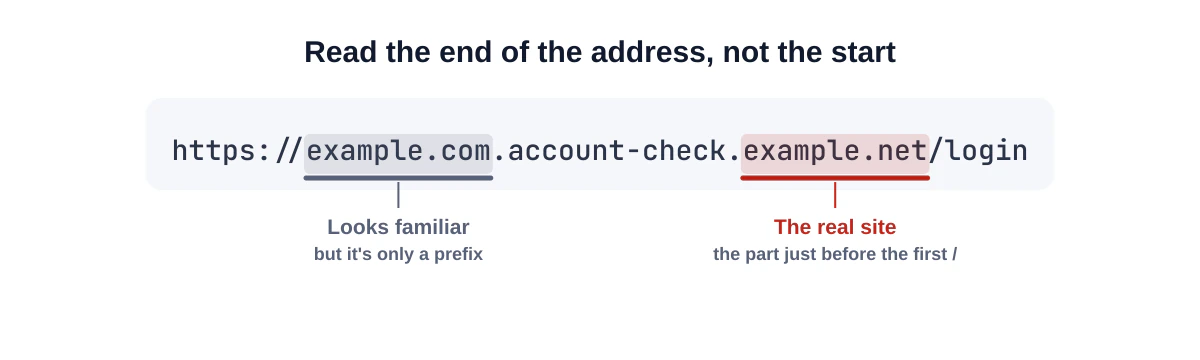
- Read the link before you open it. Your phone shows a preview of the address. Check the domain carefully. Agencies warn about look-alike domains with a misspelling or a swapped letter.
- Be suspicious of urgency. "Pay now or your car will be towed", "your account will be closed today": pressure is a hallmark of scams.
- Don't log in or pay from a scanned link if you can avoid it. Type the company's address yourself, or use their official app.
- Check physical codes for stickers or signs of tampering.
- Install apps only from your phone's official app store, never from a link in a QR code.
- Use your phone's built-in scanner. The FBI advises against downloading separate QR scanner apps, which can themselves be a risk.
- Keep your phone updated and turn on multi-factor authentication for important accounts, as the FTC recommends.
A tool to check before you open
Our QR code scanner and decoder show you the full content of a code and highlight warning signs before anything opens: links without encryption, raw IP addresses, look-alike international characters in domains, link shorteners and login tricks. We never open a link automatically.
What to do if you scanned a bad code
If you entered information on a suspicious site:
- Stop interacting with the site and with anyone who contacts you about it.
- Change passwords you entered, and any account where you reuse that password.
- Turn on two-factor authentication.
- Contact your bank or card issuer if you entered payment details, and check your statements.
- Report it. In the US, the FTC accepts reports at ReportFraud.ftc.gov and the FBI at ic3.gov. Other countries have their own national fraud-reporting services.
If you installed an app from a code, uninstall it and run your phone's security check.
Advice for businesses that use QR codes
Your customers are learning to be cautious, which is good. Help them trust your codes:
- Link to your own domain so the preview shows a name customers recognise. Unfamiliar short-link domains look suspicious. See static vs dynamic QR codes.
- Label every code with what it does and your brand name.
- Inspect public codes regularly for stickers, especially on payment-related signs.
- Use tamper-resistant placement: behind a clear cover, printed directly on the surface, or inside where staff can see it.
- Don't ask for payment or credentials immediately after a scan unless it's clearly your official checkout.
- Never send QR codes in emails that ask customers to log in. You'd be training them to fall for phishing.
Red flags at a glance
| You notice… | Why it's suspicious | What to do instead |
|---|---|---|
| A code printed on a sticker over another code | Classic tampering on meters, posters and tables | Pay through the official app or the address on the sign |
| The link preview shows a domain you don't recognise | Look-alike or unrelated site | Type the organisation's address yourself |
| A message says the code is the only way to pay | Pressure to bypass normal channels | Call the company on a number you find independently |
| The page asks you to log in "again" | Credential-harvesting pattern | Close it and open the official app |
| A code invites you to install an app | Possible malware | Install only from your phone's app store |
| An unsolicited parcel or letter tells you to scan | Bait to make you curious | Don't scan; contact the sender through known details |
Frequently asked questions
Is it safe to scan a QR code on a restaurant table?
Usually, yes, especially if it's printed on the menu or table card rather than stuck on. Check that the link preview shows the restaurant's own website or a recognised ordering service.
Can a QR code steal my contacts or photos?
Not by itself. A malicious app installed after scanning could request permissions, which is why you should only install apps from the official store.
Are QR codes from your generator safe?
The codes we generate contain exactly the content you enter, created in your browser. Their safety depends on where they point. We encourage everyone to link to destinations they own and trust.
Summary
QR codes don't hack phones; misleading destinations do. Read the link preview, resist urgency, don't pay or log in through unexpected codes, check for stickers, and only install apps from official stores. Businesses can help by linking to their own domains and labelling codes clearly. When in doubt, check a code first with our scanner.
Sources and further reading
QRaft Editorial Team
The people who build and maintain QRaft's tools. Every guide is written and checked against the tools on this site and the public specifications it cites. How we write and review guides.