What Is a QR Code? A Complete Beginner's Guide
What a QR code is, how your phone reads it, what the squares and dots mean, how much it can hold, and when it's the right tool. A plain-English guide.
You've scanned them on restaurant tables, parcels, posters and boarding passes. A QR code is a square, two-dimensional barcode that stores a small amount of data, usually a web address, which a phone camera can read in a fraction of a second. "QR" stands for Quick Response, which describes the original goal: a code that machines can read fast, from any angle, even when it's a bit dirty.
This guide explains what's actually inside that pattern, why some codes look busier than others, and how to decide whether a QR code is the right tool for what you're trying to do.
Where QR codes came from
The QR code was developed in 1994 at DENSO (the part that is now DENSO WAVE) in Japan, where engineer Masahiro Hara and his team needed a better way to track automotive parts on production lines. Ordinary barcodes held too little information and needed careful alignment with the scanner. The new code had to fit in small spaces, hold far more data, and still scan when smeared with oil.
Two decisions made the QR code what it is today. First, it was published as an open standard: it became an AIM specification in 1997, a Japanese Industrial Standard in 1999 and the international standard ISO/IEC 18004 in 2000, now in its 2024 edition. Second, DENSO WAVE chose not to exercise its patent rights for standardized QR codes. Anyone can build a generator or a scanner without paying a licence fee, which is why the format spread far beyond car factories.
How a QR code stores information
A QR code is a grid of square cells called modules. Each module is either dark or light, which is a 1 or a 0. Your content, plus some extra information that helps the scanner, is converted into a long string of bits and laid out across the grid in a specific zig-zag order.
Not every module carries your data, though. A QR code contains several fixed structures that help a scanner find and read it:
| Part | What it looks like | What it does |
|---|---|---|
| Finder patterns | The three large squares in the corners | Let the scanner locate the code and work out its orientation, so it reads from any direction |
| Separators | A one-module light border around each finder | Keep the finders distinct from the data next to them |
| Timing patterns | Alternating dark-light lines between the finders | Tell the scanner how big each module is |
| Alignment patterns | Small squares-within-squares (on larger codes) | Correct for curved surfaces and camera angles |
| Format information | Strips beside the finders | Record the error-correction level and mask used |
| Quiet zone | The empty margin around the whole code | Separates the code from its surroundings |
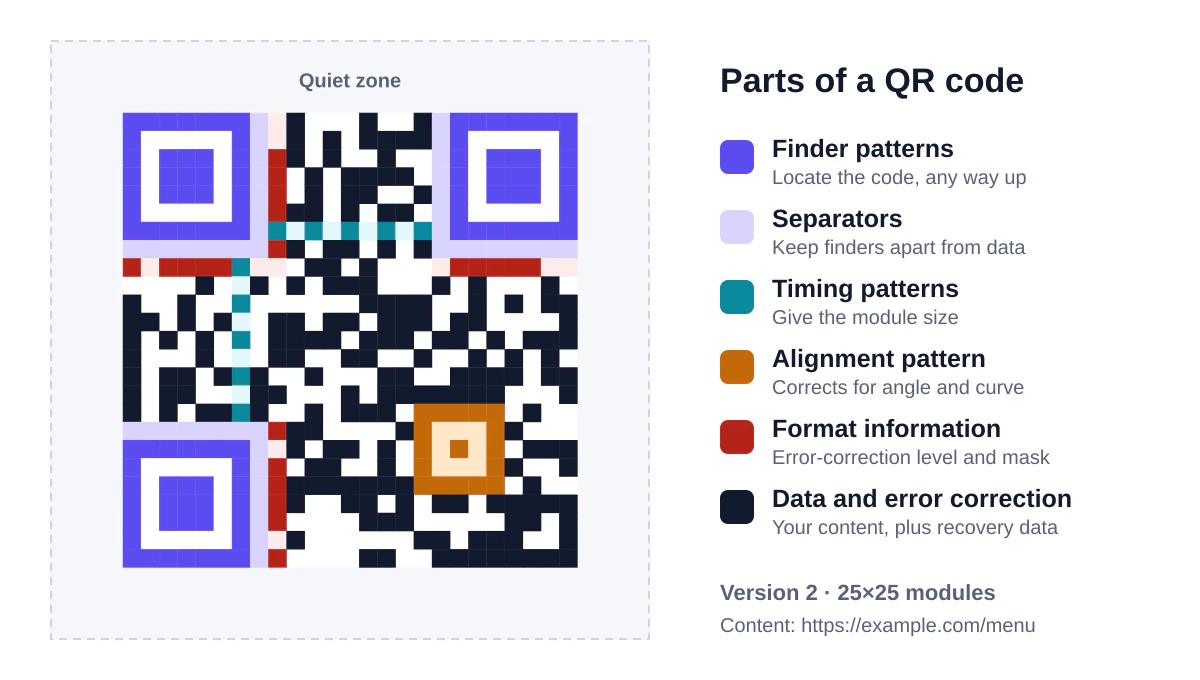
Notice that the missing fourth corner is deliberate. With finders in only three corners, a scanner can always tell which way up the code is.
Masks: why codes never look like a pattern
If your data happened to produce big blocks of solid colour or shapes that resemble a finder pattern, scanners would struggle. To prevent that, the encoder tries eight different "mask" patterns that flip modules in a predictable way, scores each result, and keeps the one that looks most evenly mixed. That's why two codes containing similar links can look completely different.
Versions: why some codes are denser than others
QR codes come in 40 sizes, called versions. Version 1 is 21 × 21 modules. Each version adds 4 modules per side, up to version 40 at 177 × 177. A generator picks the smallest version that fits your content.
This matters more than people expect. The physical size of a printed code doesn't change how much it holds; the version does. If you squeeze a long web address into a 2 cm code, each module becomes tiny and harder for a camera to resolve. The same code holding a short address has bigger modules and scans from further away.
At the very top end, a version 40 code with the lowest error correction can hold up to 7,089 digits, 4,296 alphanumeric characters or 2,953 bytes of binary data. In practice you'll want to stay far below that. A typical website link produces a version 2 to 4 code, which is easy to print and quick to scan.
Error correction: how damaged codes still work
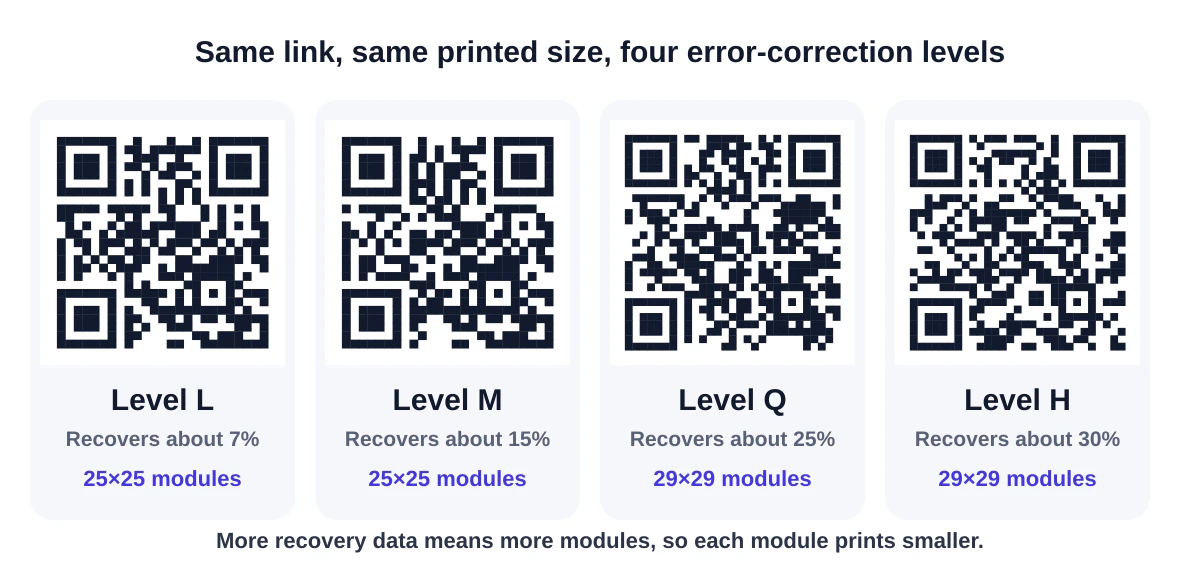
One of the cleverest parts of the design is error correction. Extra data is added using Reed-Solomon codes, the same family of maths used on CDs and in deep-space communication, so a scanner can rebuild missing pieces. You choose how much redundancy to include:
| Level | Roughly how much damage it can recover | Good for |
|---|---|---|
| L | about 7% | Clean environments, maximum data |
| M | about 15% | Most everyday uses (the usual default) |
| Q | about 25% | Codes that may get scuffed or dirty |
| H | about 30% | Codes with a logo in the middle, harsh conditions |
Higher levels mean more modules, so a denser code. It's a trade-off: our generator uses M by default and switches to H automatically when you add a logo, because the logo covers part of the pattern on purpose.
How your phone reads a QR code
When you point a camera at a code, the scanning software runs through a few steps in a split second:
- Find the three finder patterns in the image.
- Correct the perspective so a code photographed at an angle becomes a flat square.
- Sample each module to decide whether it's dark or light.
- Read the format information to learn the error-correction level and mask.
- Remove the mask, correct errors and decode the bits back into text.
- Decide what to do with the result: open a link, offer to join a Wi-Fi network, add a contact.
That last step is worth understanding. A QR code doesn't "contain a website". It contains text, and the phone recognises certain patterns in that text. Text starting with https:// becomes a link. Text starting with WIFI: becomes a network prompt. Text starting with BEGIN:VCARD becomes a contact card. Plain text is simply shown.
What can you put in a QR code?
Because the content is just text, a QR code can carry anything that fits. The common types are:
- Web links for menus, product pages, forms and videos
- Wi-Fi credentials so guests can join a network without typing a password (how to make one)
- Contact cards that save a name, phone and email straight to the address book (vCard guide)
- Email, SMS and phone actions with the recipient and message pre-filled
- Calendar events with a date, time and location
- Map locations that open the visitor's map app
- Messaging links such as a WhatsApp chat
You can make all of these with our free QR code generator, which also runs a scan test on each code before you download it.
Static and dynamic QR codes
You'll often see these two terms. A static code stores the final content directly in the pattern: once printed, it always does the same thing. A dynamic code stores a short link to a redirect service, which then forwards people to the real destination. That lets the owner change the destination later and count scans, but the code stops working if the service goes away or the subscription lapses.
Neither is better in every situation, and there's a simple middle path: point a static code at a short address on your own website and change what that page shows. We cover the trade-offs in detail in static vs dynamic QR codes.
Are QR codes safe?
The code itself can't harm a phone; it's only text. The risk is where that text sends you. Criminals have placed stickers over genuine codes on parking meters and sent fake "delivery problem" messages with codes inside. The habit that protects you is simple: look at the link preview before you open it, and be suspicious of codes that ask for payment or a login. Our guide to QR code safety goes through the warning signs.
When a QR code is the right choice
QR codes shine when someone is looking at something physical and you want to hand them off to something digital in one step: a printed menu to an online one, a product box to its instructions, a poster to a sign-up form. They're less useful when:
- People are already on a screen and could simply tap a link.
- The destination needs a login or doesn't work well on a phone.
- The code will be displayed somewhere people can't comfortably point a camera, like a fast-moving vehicle or the top of a tall billboard.
- You can't control the destination long-term and might need to change it after printing.
Frequently asked questions
Do QR codes expire?
A static QR code never expires; the content is in the pattern. A code made with a dynamic service can stop working if that service ends. And any code stops being useful if the page it points to is taken down.
Do I need an app to scan QR codes?
Not on most current phones. The built-in camera apps on iPhone and Android phones recognise QR codes automatically. On a laptop you can use a browser-based QR code scanner.
Can a QR code be any colour?
Yes, as long as there's strong contrast and the code is darker than its background. See QR code design best practices for the details.
The short version
A QR code is a standardised, licence-free way to put a little text into a pattern that cameras read quickly and reliably. Its corner squares make it easy to find, its error correction keeps it working when damaged, and its content type tells your phone what to do next. Keep the content short, keep the contrast high, test before you print, and it will do its job for years.
Sources and further reading
QRaft Editorial Team
The people who build and maintain QRaft's tools. Every guide is written and checked against the tools on this site and the public specifications it cites. How we write and review guides.