How to Create a vCard QR Code for Digital Contacts
How vCard QR codes work, which fields phones support, vCard vs MeCard, special characters and escaping, keeping the code small, and how to test it.
A vCard QR code lets someone save your contact details by pointing their camera at a square on your card, badge, email signature or shop counter. No typing, no misspelled email addresses, no "what was your surname again?" This guide explains what goes into one, why some come out denser than others, and how to make sure yours displays correctly on everyone's phone.
What a vCard is
vCard is a long-established text format for contact information, the same format your phone uses when you "share contact" or export an address book. The current specification is published by the IETF as RFC 6350 (vCard 4.0), but the older vCard 3.0 remains the most widely supported version for QR codes, and it's what our generator uses.
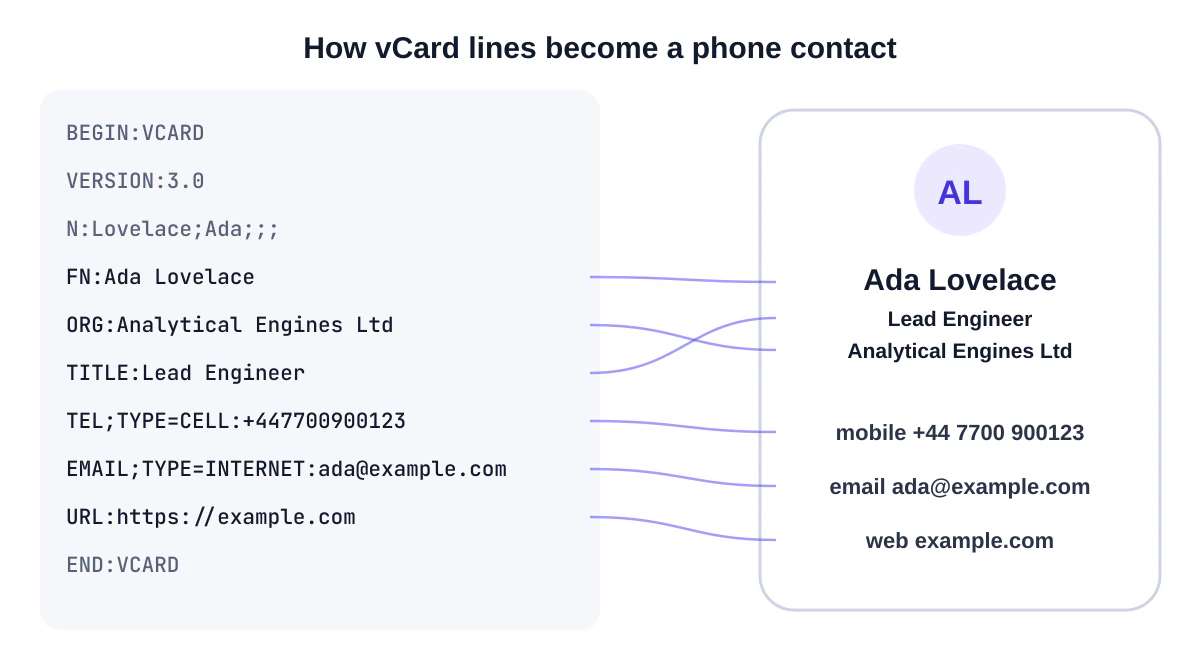
Inside the QR code, a vCard looks like this:
BEGIN:VCARD
VERSION:3.0
N:Lovelace;Ada;;;
FN:Ada Lovelace
ORG:Analytical Engines Ltd
TITLE:Lead Engineer
TEL;TYPE=CELL:+447700900123
EMAIL;TYPE=INTERNET:ada@example.com
URL:https://example.com
END:VCARD
When a phone recognises BEGIN:VCARD, it offers to create a new contact with these fields filled in.
The fields, and which ones to use
| Field | vCard property | Recommended? |
|---|---|---|
| First and last name | N and FN |
Always |
| Company | ORG |
Yes, for work cards |
| Job title | TITLE |
Yes |
| Mobile phone | TEL;TYPE=CELL |
Yes |
| Work phone | TEL;TYPE=WORK |
If people really call it |
EMAIL |
Yes | |
| Website | URL |
Yes |
| Address | ADR |
Only if people need to visit you |
| Note | NOTE |
Rarely; adds a lot of length |
Note the two name fields. N is the structured name (family name; given name) that phones use for sorting, and FN is the display name. Good generators fill both. If you only enter a company name, we use it as the display name so the contact still shows something sensible.
Phone numbers
Always use international format with the country code: +44 7700 900123, +1 555 010 0199. A number without a country code may be dialled incorrectly by someone in another country.
vCard vs MeCard
You may also see MeCard, a much shorter contact format popularised on Japanese phones and documented, alongside vCard, by the open-source ZXing barcode project:
MECARD:N:Lovelace,Ada;TEL:+447700900123;EMAIL:ada@example.com;;
MeCard produces a smaller code, but supports fewer fields and is less consistently handled by today's camera apps. We recommend vCard 3.0 for anything printed.
Special characters and escaping
vCard uses commas, semicolons and backslashes as separators, so those characters must be escaped when they appear in your data. A company called "Smith, Jones; Partners" needs to be encoded as Smith\, Jones\; Partners, or the phone may split it into fields. Line breaks inside a note become \n. Our vCard generator handles this automatically.
Accented and non-Latin characters (José, Zoë, Ελένη, 王芳) are encoded as UTF-8. Current iPhones and Android phones display them correctly, but test with the phones your contacts are likely to use if your name or company includes them.
Keeping the code scannable
Every field adds characters, and more characters mean a higher QR version with more, smaller modules. For a small printed code that's a real concern. Some guidelines:
- A name, mobile, email, company, title and website typically fits comfortably in a code that prints well at 2 to 2.5 cm.
- Adding a full address and a note can push the grid much larger. Either print bigger or trim fields.
- Watch the Grid number under the preview in our generator. Around 45 × 45 modules or fewer is easy at business-card size.
- Avoid logos on small vCard codes; they force higher error correction and an even denser pattern.
Where vCard codes work well
- Business cards: see our business card guide for placement and print tips.
- Conference badges: with each attendee's consent (events guide).
- Email signatures: as a small image for people reading on a computer who want your details on their phone.
- Reception desks and shop counters: for a business's main contact.
- Equipment and vehicles: a service contact that saves directly to the phone.
How to test properly
- Scan with an iPhone and an Android phone.
- Check the contact preview: is the name split correctly into first and last? Are accents correct?
- Save the contact. Tap the phone number to confirm it dials correctly, and the email to check it opens a new message.
- Check the company and title appear where you expect.
- If you included an address, open it in Maps from the contact.
If something looks wrong, our QR decoder shows exactly what's encoded.
Privacy
A vCard QR code contains your details in plain text; anyone who can see it can read them. Only include information you're happy to share with everyone who sees the card or badge. When you create the code with our generator, the details stay in your browser and aren't sent to our servers.
Common problems and fixes
| Problem | Likely cause | Fix |
|---|---|---|
| First and last name swapped | Only the display name was set, or fields were entered in the wrong boxes | Fill both first and last name fields; the generator writes them in the correct order |
| Company name split at a comma | Comma not escaped | Use a generator that escapes commas and semicolons |
| Accented letters look garbled | Old phone or scanner app not reading UTF-8 | Test on current devices; avoid third-party scanner apps |
| Phone number won't dial from abroad | Missing country code | Use international format such as +44 or +1 |
| The code is too dense to print small | Too many fields, or a long note | Remove the address or note, or print larger |
| Phone shows text instead of "Add contact" | Malformed vCard | Regenerate with a dedicated vCard generator |
vCard or a link to a profile?
A vCard puts your details directly onto the phone, works offline and never depends on a website. A link to an online profile can be updated and can show more, but needs a connection and an extra step to save the contact. For business cards and badges, vCard is usually the better default; our business card guide discusses when a profile link makes sense.
Frequently asked questions
Can I include a photo?
Not practically. Photos are far too large to fit in a QR code. Link to an online profile if you want a photo.
Can I update a vCard code after printing?
No, the details are fixed in the pattern. If your details change often, a link to a page you control is a better fit.
Why does my phone show "Add to contacts" for some codes and text for others?
The phone recognised one as a vCard and the other as plain text, usually because the second wasn't correctly formatted. Generate it with a dedicated vCard tool.
Summary
Use vCard 3.0, include the essentials in international format, let the generator handle escaping, keep the code compact for small print, and test on both major phone platforms. Create your vCard QR code now.
Sources and further reading
QRaft Editorial Team
The people who build and maintain QRaft's tools. Every guide is written and checked against the tools on this site and the public specifications it cites. How we write and review guides.