Static vs Dynamic QR Codes: Key Differences Explained
Static QR codes store content directly; dynamic ones redirect through a service. The real trade-offs in cost, control, privacy and longevity, plus a third option.
Shop around for a QR code generator and you'll quickly hit the words static and dynamic, usually followed by a pricing page. The distinction is real and worth understanding, but it's often explained in a way that makes static codes sound outdated and dynamic ones essential. Neither is true. This guide explains what actually differs, what each costs you over time, and a third approach that gives most people the benefits of both.
The one-sentence difference
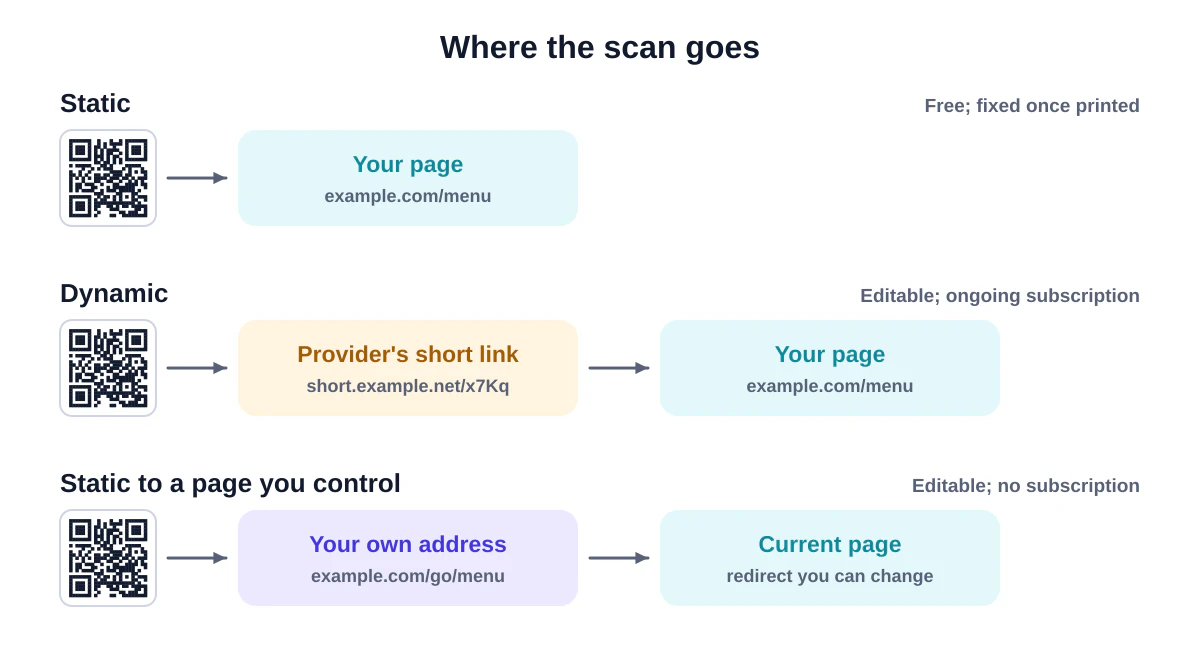
- A static QR code contains your final content, such as
https://cafe.example.com/menu, directly in its pattern. - A dynamic QR code contains a short link to someone else's server, such as
https://qr-service.example/x7Kp2, which then redirects people to your content.
Everything else follows from that. The phone scanning a dynamic code is first sent to the service, which logs the scan and forwards the visitor to wherever you've currently set the destination.
Side-by-side comparison
| Static | Dynamic | |
|---|---|---|
| What's in the pattern | Your actual content | A short link to a redirect service |
| Can you change the destination after printing? | No (but see the third option below) | Yes, in the service's dashboard |
| Scan statistics | Only through your own website analytics | Built into the service |
| Works offline (Wi-Fi, vCard, text) | Yes | No, the phone must reach the service first |
| Depends on a third party | No | Yes, for as long as the code is in use |
| Ongoing cost | None | Usually a subscription |
| Pattern density | Grows with the length of your content | Stays small because the link is short |
| Privacy | Scan goes straight to you | Every scan passes through the service |
When static is the better choice
Static codes are the right default for anything where the content is genuinely fixed, and for anything printed to last.
- Wi-Fi, contact cards, calendar events, text. These types don't involve a web page at all, so there's nothing to redirect. A static Wi-Fi code works even when the phone has no internet connection yet, which is the whole point.
- Packaging and permanent signage. A code on a product that sits in someone's cupboard for five years should not depend on a subscription you might cancel in two.
- Privacy-sensitive uses. Health information, school materials and internal documents are better off not routing every scan through an outside company.
- Simple budgets. Static codes are free to make, free to use and never expire.
When dynamic codes earn their cost
Dynamic codes make sense when you genuinely need features that a static link to your own site can't easily provide:
- Short-lived campaigns with many variants where marketers want scan counts per code without touching the website.
- No control over the destination. If you're linking to a third-party platform where you can't set up redirects, a dynamic service gives you an editable layer.
- Very long destinations. A dynamic code keeps the pattern small even when the final URL is huge.
If you choose a dynamic service, read the terms carefully. Find out what happens to your printed codes if you downgrade, stop paying, or the company closes. Some services stop redirecting, and some show their own page instead of yours.
The third option: static codes pointing to a page you control
Here's the approach we recommend for most businesses. Make a static code that points to a short, permanent address on your own domain, then change what that address does whenever you need to.
Printed code → https://cafe.example.com/menu → (you decide where this goes)
You get almost every benefit of a dynamic code:
- Editable destination. Change the page content, or set up a redirect from
/menuto this season's PDF, from your website or hosting settings. - Statistics. Your normal website analytics count visits. Add campaign parameters such as
?utm_source=table&utm_medium=qrto separate code visits from others. - No subscription and no middleman. The code keeps working as long as your domain does.
- Trust. People see your own domain in the link preview, not an unfamiliar short-link service. That matters, because consumer-protection agencies such as the US Federal Trade Commission advise people to check where a QR code leads before opening it.
The GS1 organisation, which manages product barcodes worldwide, recommends essentially the same approach for QR codes on packaging: build the link on a domain the brand controls, keep it short, and redirect to the current product information so it can change without reprinting.
How to set it up
- Choose a short path you'll never need for anything else, such as
/menu,/qr/tableor/go/spring. - Create that page, or a redirect, on your website. Most website builders and hosts have a "redirects" setting.
- Generate a static code for the full address with our URL QR code generator.
- Test it, print it, and update the redirect whenever the destination changes.
Costs over time
The real cost of a dynamic code isn't the first month; it's every month for as long as the code exists in the world. Menus get laminated, stickers stay on equipment, brochures sit in drawers. If a subscription lapses, every one of those codes can break at once. Before choosing dynamic, estimate how long your printed material will be in circulation and compare that with the total subscription cost over the same period.
Does a dynamic code scan better?
Sometimes, slightly. Because the encoded link is short, the pattern has fewer modules, and fewer modules means bigger ones at the same print size. But you get the same benefit from a short static link on your own domain. cafe.example.com/menu is only a few characters longer than most short links.
How to tell which kind a code is
Scan it with a tool that shows the content before opening it, such as our QR code scanner or decoder. If the link points to your expected website, it's probably static. If it points to a QR-code company's domain or a link shortener, it's dynamic. That's also a useful check if you've inherited printed material from a previous agency or owner.
Frequently asked questions
Can I convert a dynamic QR code into a static one?
Not the printed code itself. You can find out where it currently redirects, then make a new static code for that destination and replace the printed copies over time.
Can I edit a static QR code?
The pattern can't change, but if it points to a page you control, you can change what that page shows or where it redirects.
Are dynamic codes less secure?
Not inherently, but they add a party you have to trust. If the redirect service is compromised or reassigns your code, your printed codes could send people somewhere you didn't intend.
Summary
Use static codes for Wi-Fi, contacts, events, packaging and anything long-lived. Consider dynamic codes for short campaigns where you need built-in scan counts and can't edit your own site. For most businesses, a static code pointing to a short page on your own domain gives you editability, analytics and longevity without the subscription. Make one now with the free generator.
Sources and further reading
QRaft Editorial Team
The people who build and maintain QRaft's tools. Every guide is written and checked against the tools on this site and the public specifications it cites. How we write and review guides.