QR Codes for Product Packaging and Retail Businesses
Put QR codes on packaging that customers use: instructions, ingredients, reorders, warranties. Plus GS1 Digital Link, Sunrise 2027 and print specs.

Packaging is the one piece of marketing that every customer holds in their hands, often for weeks. A QR code turns that box, bottle or label into a direct line to the information customers want after they buy: how to use the product, what's in it, how to reorder it and how to get help. For retailers, the codes are also becoming part of how products are identified at the checkout.
This guide covers what to link to, how QR codes relate to traditional retail barcodes and GS1 standards, and the print details that matter on packaging.
What customers want from a packaging code
The best packaging codes answer post-purchase questions. Good destinations include:
| Destination | Why it works |
|---|---|
| Instructions and setup videos | Saves frustration and support calls; video beats a folded leaflet |
| Ingredients, allergens and nutrition | More detail than fits on a label; easy to keep current |
| Recipes and usage ideas | Increases how often a product gets used |
| Reorder or subscription page | Turns an empty pack into a repeat purchase |
| Warranty registration | Fewer fields, done while the box is still open |
| Recycling and disposal guidance | Local rules vary; a page can be detailed |
| Product origin and sourcing | Supports sustainability claims with evidence |
| Spare parts and accessories | Helps customers find the right compatible item |
Avoid sending people to your home page. A code on a specific product should open a page about that product.
Linking: build for a long shelf life
Packaging can stay in homes, warehouses and second-hand markets for years. The code you print today has to keep working for at least that long.
- Use your own domain, not a short-link or subscription QR service that might change terms or close.
- Use a short, stable path per product, such as
brand.example.com/p/5012345678900orbrand.example.com/kettle-k2, and redirect it to the current product page. GS1's guidance on QR codes for products recommends the same pattern: a brand-controlled domain, short links, and redirection to product information so it can change without reprinting. - Don't encode campaign details that will be out of date in six months. Keep marketing tags for the landing page or redirect.
If you produce many products, the bulk QR code generator creates one code per SKU from a spreadsheet, named for each product.
QR codes and retail barcodes: what's changing
For decades, retail checkout has relied on 1D barcodes such as EAN-13 and UPC-A, which carry a product's GTIN (Global Trade Item Number). GS1, the organisation that manages these numbers, explains that the brand owner normally assigns GTINs using a GS1 Company Prefix obtained by joining a GS1 member organisation.
GS1 Digital Link
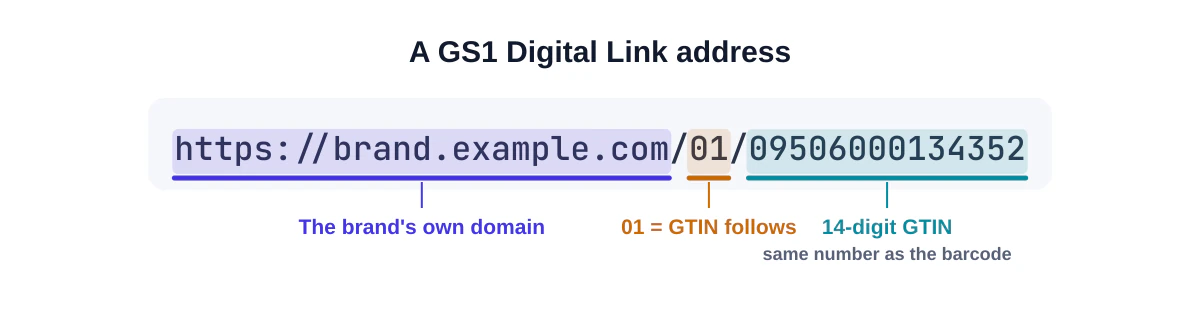
GS1 Digital Link is a standard that expresses GS1 identifiers, such as the GTIN, as a web address. One QR code can then serve two audiences: a checkout scanner reads the GTIN to look up the price, and a customer's phone opens a web page about the product. GS1 describes it not as a new identification system but as an extension of its existing one.
A Digital Link address includes the GTIN in a standard structure, for example a path containing /01/ followed by the 14-digit GTIN on the brand's domain.
Sunrise 2027
In the US, the retail industry and GS1 US have been working towards a transition known as Sunrise 2027, in which point-of-sale systems become able to read 2D barcodes such as QR codes with GS1 Digital Link and GS1 DataMatrix. GS1 US's guidance for brands is to add 2D codes carrying the same GTIN as the product's existing barcode. During the transition, GS1 notes that a 1D barcode is still needed on retail products because not all retail systems can scan 2D codes yet.
What this means for you
- If you sell through major retailers, follow your GS1 member organisation's guidance and your retailers' requirements. GS1 Digital Link QR codes must be built to the GS1 standard and validated; check with your local GS1 office for printing specifications.
- If you sell direct or through small shops, a normal QR code linking to your product page is perfectly fine, alongside any barcode your retailers require.
- Don't remove your EAN/UPC in favour of a QR code unless your retailers have confirmed they can scan it.
Our barcode generator creates EAN, UPC and ITF-14 barcodes with correct check digits, but it can't issue GTINs; those come from GS1. For more on the differences between the two kinds of code, read QR code vs barcode.
Print and placement on packaging
- Size: at least 2 cm for close-range use; more if the code is dense or styled.
- Flat surfaces: avoid wrapping a code around a tight curve on bottles and cans; use a flat face or keep the code small relative to the curve.
- Contrast: dark code on a light area of the pack. Packaging designers love dark backgrounds; put the code on a light panel.
- Finishes: keep foil, metallic inks, high-gloss varnish and embossing off the code.
- Quiet zone: keep at least four modules of clear space; don't let die lines, folds or seams run through it.
- Supply vector artwork (SVG, PDF or EPS) so the code stays crisp through the printer's workflow.
- Proof on the real substrate. Kraft paper, film and corrugated board all print differently. Scan the physical proof with several phones.
See QR code design best practices for more on colour, logos and sizing.
Telling customers why to scan
A short call to action makes a big difference: "Scan for setup videos", "Scan for recipes and full ingredients", "Scan to reorder". Put it right next to the code. If the code leads to important safety or regulatory information, check whether that information must also be printed on the pack in your market; a code is usually a supplement, not a replacement.
Measuring
If codes link to your own site, your analytics show visits per product. Compare scans against units sold to see which products' customers engage most, and look at what they do after landing: do they watch the video, reorder, or bounce?
Pre-print checklist for packaging
- The code links to a product-specific page on your own domain.
- The page loads quickly on a phone and covers what the call to action promises.
- The code is dark on a light, flat area with a clear quiet zone.
- Artwork uses a vector file supplied at the final size.
- Required retail barcodes (EAN/UPC) are still present and unaffected.
- A physical proof on the real substrate scans with several phones.
Frequently asked questions
Can a QR code replace my product barcode?
Not yet for most retailers. During the 2D transition, GS1 advises keeping the 1D barcode on retail products.
Do I need GS1 membership to put a QR code on packaging?
No, not for a normal marketing QR code. You need a GS1 Company Prefix to assign GTINs and to create standards-compliant GS1 Digital Link codes used at checkout.
What if the product page changes?
That's why you link to a short, stable address you control and redirect it as needed.
Summary
Link packaging codes to product-specific, post-purchase information on your own domain; design them to survive print, folds and finishes; tell customers why to scan; and keep your existing retail barcode until your retailers are ready for 2D. When you're ready to create codes for a product line, start with the bulk generator.
Sources and further reading
- What is GS1 Sunrise 2027? (GS1 US)
- What is GS1 Digital Link? (GS1 support)
- Differences between GS1 DataMatrix, Data Matrix with GS1 Digital Link and QR Code with GS1 Digital Link (GS1 support)
- Best practices for creating your QR Code powered by GS1
- Who is responsible for numbering trade items? (GS1 support)
QRaft Editorial Team
The people who build and maintain QRaft's tools. Every guide is written and checked against the tools on this site and the public specifications it cites. How we write and review guides.