How to Use QR Codes in Marketing Campaigns
Plan QR codes that people actually scan: the value exchange, landing pages, UTM tracking per placement, creative and print specs, and how to judge results honestly.
A QR code in a marketing campaign is a promise: "point your phone here and something worthwhile happens." Campaigns succeed when that promise is clear and kept. They fail when the code is an afterthought slapped into a corner, linking to a home page that doesn't mention the offer.
This guide walks through planning, building, placing and measuring QR codes in campaigns, from posters and direct mail to packaging and events.
1. Define the value exchange
Scanning costs the viewer effort: stopping, unlocking a phone, opening the camera, waiting for a page. Your offer has to be worth more than that effort. Strong reasons to scan include:
- Something exclusive: a discount, early access or a members-only price.
- Something useful right now: a timetable, a size guide, instructions, directions.
- Something you can't put on paper: a video demo, a configurator, a booking calendar.
- Something that saves typing: a pre-filled sign-up form or a WhatsApp chat.
Write the reason as your call to action, right next to the code: "Scan to see this sofa in your room", "Scan for 15% off your first order", "Scan to book a free test drive". A code with no call to action asks people to guess.
2. Build a landing page made for scanners
Every scan lands on a phone. The page should:
- Match the creative. If the poster says "15% off", the first thing on the page should say "15% off". Mismatches feel like a bait-and-switch.
- Load fast on mobile data. Compress images, avoid heavy video autoplay, and test on a weak connection.
- Ask for little. One clear action, with as few form fields as possible.
- Live at a permanent address on your domain, such as
brand.example.com/spring. If the campaign changes, you update the page, not the print. Our static vs dynamic guide explains this approach.
3. Track each placement separately
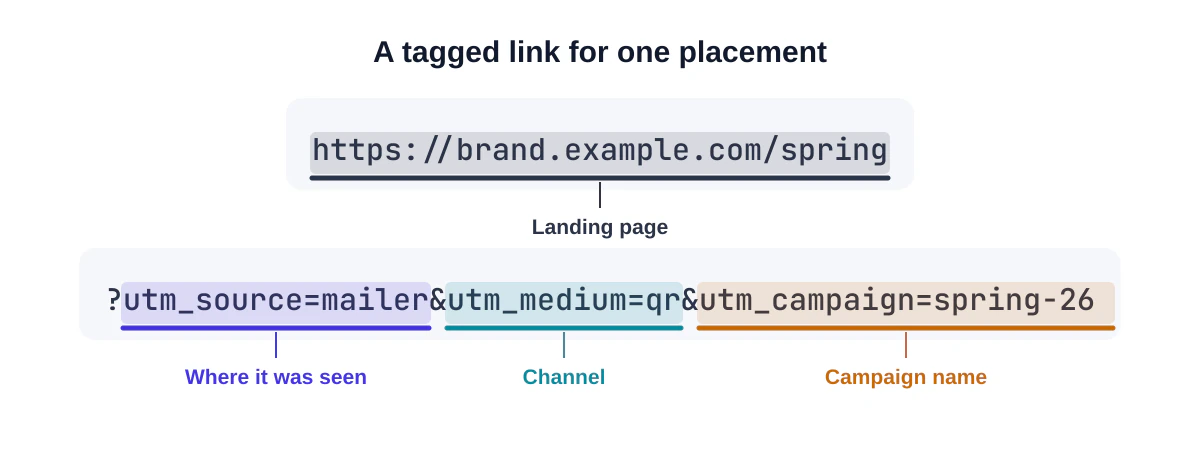
A static QR code doesn't count scans by itself, but your web analytics can attribute visits precisely if you tag the link with campaign parameters. Google Analytics recommends always setting three of them:
| Parameter | Meaning | Example |
|---|---|---|
utm_source |
Where the code was seen | bus-shelter, mailer, pack |
utm_medium |
The channel | qr |
utm_campaign |
The campaign | spring-26 |
utm_content (optional) |
Creative variant | red-headline |
So a code on a direct-mail postcard might encode:
https://brand.example.com/spring?utm_source=mailer&utm_medium=qr&utm_campaign=spring-26
Create one code per placement with a different utm_source. Then you can compare the bus shelter against the mailer against the in-store poster, instead of guessing. Keep values short and lowercase: they're case-sensitive, and every character makes the code a little denser.
If you have many variants, the bulk QR code generator can create one code per row of a spreadsheet and name each file, so the right code goes on the right artwork.
4. Design for the medium
Different media are scanned in very different ways.
| Medium | Typical scan distance | Practical guidance |
|---|---|---|
| Business card, flyer, packaging | 15–30 cm | At least 2 cm wide |
| Magazine, brochure | 20–40 cm | 2.5–3 cm; keep away from the binding |
| Counter display, table tent | 40–80 cm | 4–6 cm |
| Poster | 1–2 m | 10–20 cm |
| Large outdoor sign | Several metres | Very large; consider whether people can stop safely |
A useful rule of thumb is that the code should be at least one tenth of the scanning distance. Shorter links help too, because they produce codes with fewer, larger modules.
Other design points:
- Dark code, light background, generous quiet zone. Always.
- Brand colours and a logo are fine if contrast stays high and the logo stays small. Our generator's scan test helps you check.
- Use vector files (SVG or PDF) for print artwork so the code stays crisp.
- Mind the surface. Curved bottles, glossy laminates and shop windows all cause trouble. Test the real material.
See QR code design best practices for the details.
5. Place it where people can actually scan
The best creative in the world fails if the code is unreachable. Before signing off a placement, ask:
- Can someone stand still here for a few seconds? Fast-moving traffic, escalators and busy doorways are poor spots.
- Is there mobile signal? Underground stations and basements often have none.
- Is the code at a comfortable height and close enough to read?
- Is it well lit at the times people pass?
Transit ads, waiting rooms, queues, table tops and packaging work well because people have time.
6. Build trust into the code
Many people have heard about QR code scams, and agencies like the US Federal Trade Commission advise checking where a code leads before opening it. Make the check easy:
- Link to your own domain, not an anonymous short link, so the preview shows your brand.
- Put your logo or brand name next to the code.
- Avoid asking for payment or login details immediately after a scan.
- For outdoor placements, check for stickers placed over your code.
7. Judge the results honestly
After the campaign, look beyond scan counts:
- Visits per placement, from your
utm_sourcevalues. - Conversion rate from those visits: sign-ups, bookings, purchases.
- Cost per result for each medium, including print and placement costs.
- Qualitative feedback from staff: did people mention the code? Did anyone struggle?
Low scans don't always mean QR codes "don't work". Usually the offer wasn't compelling, the placement was awkward, or the call to action was missing. Change one thing at a time and test again.
Campaign ideas that tend to work
- Packaging that unlocks content: recipes, setup videos, refill reminders.
- Direct mail with a personal landing page, using the bulk generator to create a code per region or segment.
- Event signage that opens the agenda or a feedback form (events guide).
- In-store displays that open reviews, size guides or stock availability.
- Print ads with an exclusive code, so you can measure that publication's response.
A worked example
A bakery is launching a weekday lunch deal. It prints three things:
| Placement | Encoded link | Call to action |
|---|---|---|
| Window poster | bakery.example.com/lunch?utm_source=window&utm_medium=qr&utm_campaign=lunch |
"Scan to see this week's lunch menu" |
| Bag insert | bakery.example.com/lunch?utm_source=bag&utm_medium=qr&utm_campaign=lunch |
"Scan to pre-order tomorrow's lunch" |
| Office flyer | bakery.example.com/lunch?utm_source=office&utm_medium=qr&utm_campaign=lunch |
"Scan for team lunch orders" |
After four weeks, the analytics show the bag insert drives the most pre-orders, the office flyer drives the largest orders, and the window poster mostly brings browsing visits in the evening. The bakery reprints more bag inserts, keeps the flyers for local offices, and changes the window poster's offer. Each decision comes from comparing placements, not from a total scan count.
Frequently asked questions
Do I need dynamic QR codes for tracking?
No. Campaign parameters on a link to your own site give you placement-level tracking in your existing analytics, at no cost.
Can I change the landing page mid-campaign?
Yes, if the code points to a page you control. Edit or redirect the page; the printed codes stay valid.
What's a good scan rate?
There isn't a reliable universal benchmark; it depends heavily on medium, audience, placement and offer. Compare your own placements against each other and against your previous campaigns.
Summary
Give people a real reason to scan, say it next to the code, send them to a fast page that matches the promise, tag each placement, size and place the code for how it'll be seen, and judge results on outcomes rather than scans. Start building your campaign codes with the free generator.
Sources and further reading
QRaft Editorial Team
The people who build and maintain QRaft's tools. Every guide is written and checked against the tools on this site and the public specifications it cites. How we write and review guides.