QR Code vs Barcode: Differences, Advantages, and Use Cases
How QR codes and 1D barcodes differ in capacity, scanning, error correction and use. Compare EAN, UPC, Code 128, Data Matrix and QR, and pick the right one.
Strictly speaking, a QR code is a barcode: a two-dimensional one. But when people say "barcode", they usually mean the familiar row of vertical stripes on a cereal box. Those 1D (linear) barcodes and 2D codes like QR are built for different jobs, and choosing the right one depends on what you need to store, who will scan it and with what.
The core difference
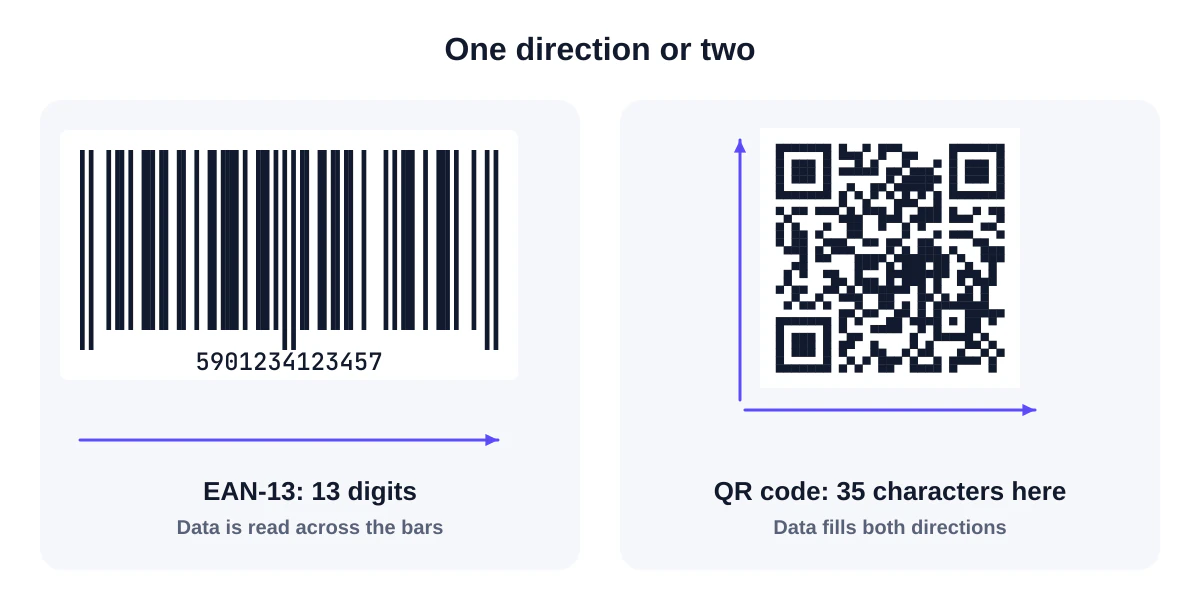
A 1D barcode stores data in one direction only: the widths of bars and spaces read from left to right. A scanner sweeps a line across it.
A 2D code stores data in both directions, as a grid of cells. A camera captures the whole pattern at once. Because it uses the second dimension, it holds vastly more information in the same space.
Side-by-side comparison
| 1D barcode (e.g. EAN-13, Code 128) | QR code | |
|---|---|---|
| Structure | Bars and spaces in one row | Grid of square modules |
| Typical content | A product number or short ID | Links, text, Wi-Fi, contacts, IDs |
| Capacity | Usually a few to a few dozen characters | Up to 7,089 digits or 2,953 bytes at the largest size |
| Reads with | Laser or camera scanners | Cameras (including every modern phone) |
| Orientation | Must be roughly aligned with the scan line | Any angle; reads in 360° |
| Damage tolerance | Limited; a check digit detects errors but can't fix them | Error correction can rebuild up to about 30% at level H |
| Space needed | Long and thin | Square and compact |
| Human-readable digits | Usually printed underneath | Not usually |
| Typical users | Retail checkouts, warehouses, libraries | Consumers, marketing, tickets, payments, industry |
How each handles errors
This is an underrated difference. Retail barcodes such as EAN-13 and UPC-A include a check digit calculated from the other digits. If one digit is misread, the check fails and the scanner rejects the read, so the cashier rescans. It detects errors but can't correct them.
QR codes include Reed-Solomon error correction, which can actually reconstruct missing or damaged parts. You choose how much: about 7% (L), 15% (M), 25% (Q) or 30% (H). That's why a QR code can carry a logo in its centre or survive scuffs on a parcel.
Common barcode types and where they're used
| Type | Kind | Typical use |
|---|---|---|
| EAN-13 / UPC-A | 1D | Retail products worldwide (EAN) and in North America (UPC) |
| EAN-8 / UPC-E | 1D | Small retail packages |
| ITF-14 | 1D | Outer cartons and cases in logistics |
| Code 128 | 1D | Shipping labels, asset tags, internal IDs; supports letters |
| Code 39 | 1D | Older industrial and inventory systems |
| Codabar | 1D | Libraries, blood banks, legacy systems |
| QR Code | 2D | Consumer links, tickets, payments, Wi-Fi, marketing, industry |
| Data Matrix | 2D | Very small items: electronics, medical devices, pharmaceuticals |
| PDF417 | 2D (stacked) | ID cards, boarding passes, shipping documents |
| Aztec | 2D | Transport tickets and boarding passes |
You can create the common 1D types with our barcode generator, which calculates and verifies GS1 check digits, and read them with the barcode reader.
When to use a 1D barcode
- Retail checkouts that require EAN or UPC, which is still true for most retailers.
- Warehouses and logistics where laser scanners and established systems expect Code 128 or ITF-14.
- Simple numeric IDs on assets, library books or tickets in systems already built around linear codes.
- When a human must type the number if scanning fails: linear barcodes normally print the digits beneath.
When to use a QR code
- Anything a customer scans with a phone: links, menus, Wi-Fi, contact details, app downloads.
- More data than a few characters, like a full URL or structured information.
- Small or awkward spaces where a long barcode won't fit.
- Rough environments where error correction helps.
- Any angle: conveyor belts, hand-held items, codes people approach from different directions.
The two are converging in retail
For decades, product packaging needed a 1D barcode for the till. Now the retail industry is moving towards 2D codes that do both jobs. Under the initiative known as Sunrise 2027 in the US, retailers are upgrading checkout scanners to read 2D codes such as QR codes with GS1 Digital Link and GS1 DataMatrix. A GS1 Digital Link QR code contains the product's GTIN in a web-address format, so the checkout reads the price while a customer's phone opens product information.
GS1's guidance is that QR with GS1 Digital Link is currently the preferred option for consumer engagement, because phones' default camera apps can open it, and that a 1D barcode is still needed on retail products until the transition is complete. So for now, many products carry both. Our packaging guide explains what that means for brands.
Cost and practicality
Both kinds of code are free to generate. The costs lie elsewhere:
- Product numbers (GTINs) for retail come from GS1 membership, whether you print them as EAN/UPC or inside a GS1 Digital Link QR code.
- Scanning hardware: older laser scanners can't read 2D codes; camera-based (imager) scanners read both.
- Print space and quality: 1D codes need width and precise bar edges; QR codes need a square area with a quiet zone.
A quick decision guide
Answer these in order:
- Will a shopper's phone scan it? Use a QR code.
- Does a retailer or marketplace require a product barcode? Use EAN-13 or UPC-A with a registered GTIN, and add a QR code for customers if useful.
- Is it an outer carton in a warehouse? ITF-14 or a GS1-128 shipping label, as your logistics partners specify.
- Is it an internal label for your own system? Code 128 if your scanners are laser-based; a QR code if they're camera-based and you want more data.
- Is the space tiny? A 2D code, such as QR, Micro QR or Data Matrix, fits far more into a small square.
Frequently asked questions
Can a phone read normal barcodes?
Phone cameras can, with the right software. Many phones' built-in camera apps focus on QR codes, but dedicated apps and browser tools like our barcode reader read EAN, UPC and Code 128.
Can I put a product's barcode number in a QR code?
You can encode any number in a QR code, but a checkout will only recognise it as a product if it follows the GS1 Digital Link standard and the retailer's systems support it.
Which is more secure?
Neither format is encrypted. Both simply store data. Security depends on what the data is and what the scanning system does with it.
Summary
Use 1D barcodes where existing retail and logistics systems expect them, and QR codes where people scan with phones or where you need more data, compact size or damage tolerance. In retail, the two are converging through GS1 Digital Link, but keep the 1D barcode until your retailers say otherwise. Try both with our barcode generator and QR generator.
Sources and further reading
QRaft Editorial Team
The people who build and maintain QRaft's tools. Every guide is written and checked against the tools on this site and the public specifications it cites. How we write and review guides.