How to Create a QR Code for WhatsApp
Make a QR code that opens a WhatsApp chat with your number and an optional pre-written message. The correct wa.me format, common mistakes and business uses.
For many small businesses, WhatsApp is the front desk. A QR code that opens a chat with your number, with a message already typed, removes two annoying steps for customers: saving your number as a contact and working out what to write.
This guide explains how WhatsApp's click-to-chat links work, how to turn one into a QR code, and the small formatting mistakes that make these codes fail.
How it works
WhatsApp supports a feature called click to chat. According to WhatsApp's help centre, a link in this format opens a chat with a specific number, even if it isn't saved in the person's contacts:
https://wa.me/<number>
To pre-fill the message box, add ?text= followed by the message, URL-encoded:
https://wa.me/447700900123?text=Hi%2C%20I%27d%20like%20a%20quote
A WhatsApp QR code is simply this link encoded as a QR code. When someone scans it, their phone opens WhatsApp with your chat and the message ready to send. Nothing is sent until they tap send.
Step by step
- Open the generator and choose WhatsApp.
- Enter your number in full international format, including the country code, for example
+44 7700 900123or+971 50 123 4567. Spaces and dashes are fine; we clean them up. - Optionally write a pre-filled message. Keep it short and helpful.
- Check the scan test, download, and test with your own phone (scan from a different phone than the one using that WhatsApp number).
Getting the number right
WhatsApp's guidance is specific: use the full number in international format, and omit any zeros, brackets or dashes. The plus sign isn't used in the link either. Common mistakes:
| What people type | Problem | Correct link number |
|---|---|---|
07700 900123 (UK) |
Missing country code, has a trunk zero | 447700900123 |
+44 (0)7700 900123 |
Contains the trunk zero in brackets | 447700900123 |
00971501234567 |
International dialling prefix included | 971501234567 |
+1-555-010-0199 |
Fine once cleaned up | 15550100199 |
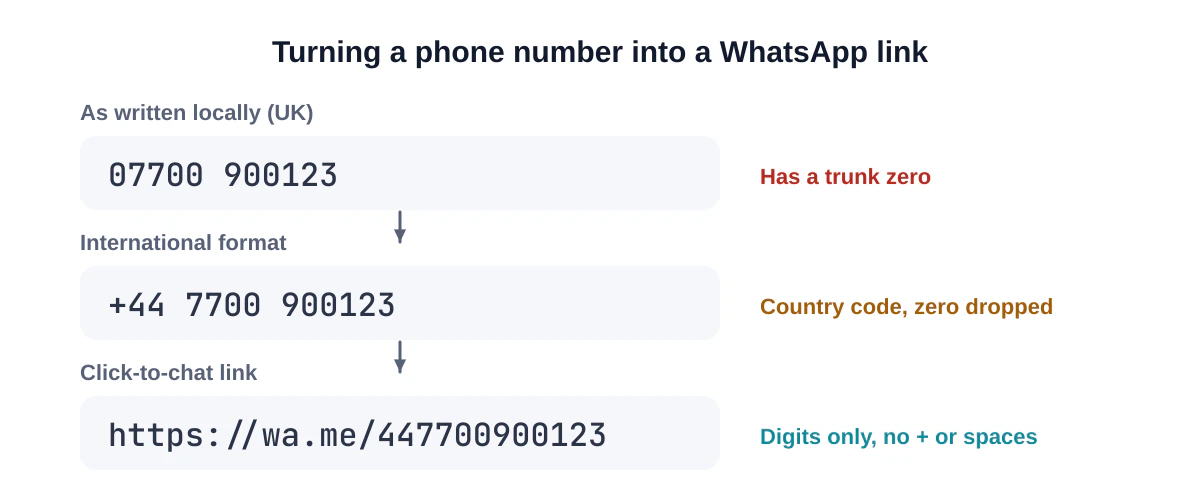
The trunk zero is the classic error. Many countries write numbers with a leading zero for domestic calls (the UK, the UAE, Egypt, Australia and many others), but that zero is dropped after the country code. If your code opens WhatsApp but it says the number is invalid, check this first.
Writing a good pre-filled message
The pre-filled text is a nudge, not a script. It helps people start and helps you know where they came from.
- Short and natural: "Hi! I'd like to book a table."
- Context for you: "Hi, I scanned the code on your van and need a quote."
- Placement tags: different messages for different placements ("…from your flyer", "…from the shop window") tell you which codes are used.
- Nothing personal: don't pre-fill names, order numbers or anything sensitive, because the same code is used by everyone.
Special characters, emojis and line breaks are fine; the generator encodes them correctly.
Business ideas
- Shop window or door: "Closed? Message us on WhatsApp" for after-hours enquiries.
- Vehicles and site boards: quotes and call-backs for trades.
- Packaging and receipts: reorders and support.
- Restaurant tables: takeaway orders or bookings.
- Event stands: follow-up conversations with visitors.
- Classified ads and property signs: enquiries without revealing a number in text (though the number is visible in the chat).
Privacy and trust
- Your number is visible to anyone who scans the code; it's in the link. Use a business number if you don't want to share your personal one.
- Label the code clearly with "WhatsApp" and your business name, so people know what will open. Agencies like the US Federal Trade Commission advise people to check where a code leads before opening it, and a clear label makes that check easy.
- If you use a WhatsApp Business account, set up a greeting message and business hours so people get an immediate reply.
Design tips
- A wa.me link with a short message makes a compact code that's easy to print small. Long messages make denser codes; keep them under a sentence or two.
- You can use WhatsApp-style green, but keep it dark enough for contrast on white. A deep green works; bright light green on white is too faint.
- Avoid adding WhatsApp's own logo unless your use complies with WhatsApp's brand guidelines. Your own logo is a safer choice.
- Print at least 2 cm wide for close-up use and bigger for windows and vehicles.
Troubleshooting
WhatsApp says the number is invalid. The number is in the wrong format or not registered on WhatsApp. Check the country code and trunk zero.
It opens a browser page instead of the app. On some devices, the wa.me page appears first with a button to continue to the chat. That's normal behaviour, not a broken code.
The message is cut off. Very long messages can be truncated by some devices. Shorten it.
It opens the wrong chat. You've probably encoded a different number. Scan with our QR decoder to see exactly what's inside.
One number, several codes
Because the pre-filled message travels with the code, you can create a different code for each place you display it and tell where conversations come from without any tracking tools:
| Placement | Pre-filled message |
|---|---|
| Shop window | "Hi! I saw your window and have a question." |
| Delivery van | "Hi, I saw your van. Could I get a quote?" |
| Flyer | "Hi, I'm interested in the offer on your flyer." |
| Receipt | "Hi, I'd like to reorder." |
When a chat starts with one of these messages, you know which placement worked. The bulk generator can create a set like this from a list if you have many locations.
Getting more from WhatsApp Business
If you use a WhatsApp Business account, a few settings make QR-code conversations go more smoothly:
- Greeting message: an automatic reply for first-time chats, so people get an instant response.
- Away message: sets expectations outside business hours.
- Quick replies: saved answers for common questions such as opening hours or prices.
- Business profile: add your address, hours and website so people can check you're legitimate.
These features are set up inside the WhatsApp Business app; the QR code itself stays the same.
Frequently asked questions
Can a WhatsApp QR code open a group?
Group invite links are a different feature with their own links, which you can create inside WhatsApp and turn into a normal URL QR code. Be careful: anyone with a group invite link can join.
Does the person need my number saved?
No. That's the point of click to chat.
Does the code expire?
No. It keeps working as long as the number is registered on WhatsApp.
Summary
Use https://wa.me/ plus your full international number without the plus, zeros or punctuation, add a short pre-filled message if it helps, label the code clearly, and test it from a second phone. Create your WhatsApp QR code now.
Sources and further reading
QRaft Editorial Team
The people who build and maintain QRaft's tools. Every guide is written and checked against the tools on this site and the public specifications it cites. How we write and review guides.